


Born in a machine shop in 1981, MIE Solutions was built from the ground up to understand the challenges discrete manufacturers face every day. Our software has been shaped by continuous input from 500+ precision manufacturers and fabricators—from small job shops to multi-site enterprises—ensuring every feature solves real production problems, not theoretical ones.
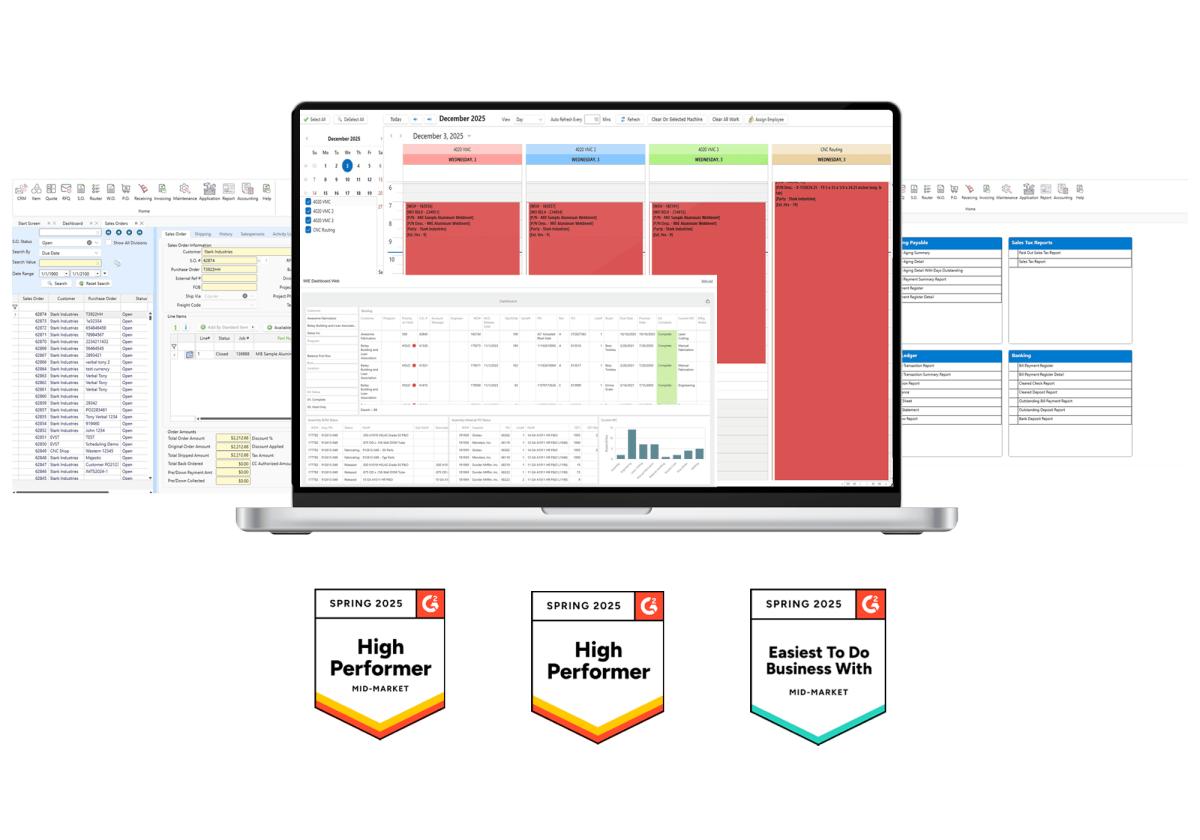

Save time and increase the accuracy of estimating with MIE Trak Pro’s quoting functionality which allows you to personalize formulas, track win/loss, and create quotes based on true costing data.
Learn more
Take your quote and create a Sales Order in just a few clicks. Sales Orders can be created from an RFQ, Quote, PDF, EDI, and more—depending on your team’s workflow.
Learn more
Gain insights into your production environment with MIE Trak Pro’s Work Order module. See all the information you want related to production in real-time.
Learn more
Schedule production quickly and accurately with forward finite, backward infinite, and calendar-based drag-and-drop scheduling. Take the guesswork out of scheduling employees and machines to jobs.
Learn more
Make purchasing easy and efficient with MIE Trak Pro’s Purchasing module. Order material based on MRP forecasting, min/max reorder points, production demand, and more.
Learn more
Track your inventory and the information that matters to you, including lot number serialization, locations, remnants, WIP, non-netted, consignment, and more.
Learn more
MIE Trak Pro’s built-in quality management system (QMS) allows you to accurately track Corrective and Preventive Action Requests (CPAR), non-conformance, RMAs, and more to pass QC audits with ease.
Learn more
Drive intelligent business decisions by using any of MIE Trak Pro’s standard reports or create personalized queries to get answers to the questions most important to you.
Learn more
Use MIE Trak Pro’s Kiosk module to track real-time job progress and employee clock-in (without the need for paper timesheets). Shop floor employees can see their schedule, view documents, issue material to jobs, create PO requests, and more.
Learn more
Integrate your accounting practices through MIE Trak Pro. Manage G/L Accounts, journal entries, reports, and cash flow projections, in addition to other critical accounting capabilities.
Learn moreSkip the generic demos. Book a 1-on-1 session to see exactly how MIE Trak Pro handles your unique challenges.

For machine shops and manufacturing businesses, efficiency and profitability depend on well-coordinated operations. Managing production schedules, inventory levels, quality control, and customer orders across multiple projects requires sophisticated coordination. Without proper systems in place, even the most skilled machinists can find themselves struggling with inefficient processes, missed deadlines, and rising operational costs.
Implementing a machine shop ERP system transforms how manufacturers manage their operations from quote to delivery. These integrated software solutions address the unique challenges facing job shops, providing the visibility and control needed to compete in today’s demanding manufacturing environment. While the investment in ERP technology requires careful planning, the risks of operating without these systems can far outweigh the initial costs.
Modern machine shop management software integrates all aspects of production planning and execution into a single, unified platform. Unlike generic business software, these specialized systems understand the complexities of custom manufacturing, where every job presents unique requirements and challenges.
What sets machine shop management software apart is its ability to handle the intricate relationships between customer specifications, material requirements, machine capabilities, and delivery schedules. When a customer places a new order for 50 stainless steel enclosures due in three weeks, the system automatically evaluates current capacity, material availability, and existing commitments to determine feasibility.
The software tracks every aspect of production, from initial quote through final delivery. This includes managing engineering drawings, work instructions, quality specifications, and shipping requirements. For shops handling multiple concurrent projects, this level of organization becomes essential for maintaining profitability and customer satisfaction.
Integration capabilities allow these systems to connect with existing CAD/CAM software, quality management systems, and financial applications. This connectivity eliminates data silos and ensures information flows seamlessly throughout the organization.
A robust job shop ERP solution provides the flexibility needed for custom manufacturing environments. Unlike repetitive manufacturing, job shops must adapt quickly to changing customer requirements, material availability, and production priorities.
Job shop ERP systems excel at managing the complexity inherent in custom manufacturing. Each project requires unique routing, different materials, and specialized tooling. The system tracks these variables while maintaining visibility into overall shop performance and capacity utilization.
Production scheduling becomes manageable when the ERP system can balance multiple competing priorities. If a rush order arrives, the system evaluates the impact on existing jobs and suggests optimal rescheduling options. This capability prevents the chaos that often accompanies urgent customer requests.
Quality management features ensure that each job meets customer specifications while maintaining compliance with industry standards. The system documents inspection results, tracks non-conformances, and maintains complete traceability throughout the production process.
Cost tracking functionality provides accurate job costing information, enabling shops to quote competitively while maintaining profitability. The system captures all direct and indirect costs associated with each project, providing insights that improve future estimating accuracy.
Effective machine shop ERP software encompasses several critical functional areas that address the unique requirements of custom manufacturing operations.
Production Planning and Scheduling
Advanced scheduling capabilities balance capacity constraints with delivery requirements. The system considers machine availability, operator skills, tooling requirements, and material delivery schedules when creating production plans. Real-time updates ensure schedules remain accurate as conditions change throughout the day.
Inventory and Material Management
Sophisticated inventory tracking manages raw materials, work-in-process, and finished goods across multiple locations. Automatic reorder points prevent stockouts while minimizing carrying costs. The system tracks material certifications and maintains lot traceability for quality and compliance purposes.
Quality Control Integration
Built-in quality management features document inspection procedures, track measurement data, and manage non-conformance reports. Integration with measurement equipment automates data collection and reduces manual documentation requirements.
Financial Integration
Seamless integration with accounting systems ensures accurate cost tracking and financial reporting. The system captures all project costs in real-time, providing immediate visibility into job profitability and overall financial performance.
Document Management
Centralized document storage maintains current versions of drawings, work instructions, and quality procedures. Version control prevents errors caused by outdated documentation while ensuring operators always access the correct information.
Small machine shop ERP solutions address the unique challenges facing growing manufacturers who need sophisticated functionality without overwhelming complexity. These systems provide enterprise-level capabilities while remaining accessible to smaller organizations with limited IT resources.
Scalability becomes crucial as shops expand their operations. The ERP system must accommodate increasing transaction volumes, additional users, and expanded functionality without requiring complete replacement. Cloud-based deployment options eliminate the need for significant hardware investments while providing automatic updates and maintenance.
Implementation approaches for smaller shops often emphasize rapid deployment and immediate value realization. Phased rollouts allow organizations to implement core functionality first, then add advanced features as users become comfortable with the system.
Training requirements remain manageable when the software interface follows intuitive design principles. Modern ERP systems provide role-based dashboards that present relevant information without overwhelming users with unnecessary complexity.
Cost structures for small machine shop ERP typically include subscription-based pricing that aligns expenses with business growth. This approach eliminates large upfront investments while providing predictable monthly costs that scale with usage.
Finding the best ERP for machine shops involves analyzing features, scalability, and industry-specific functionality against your organization’s unique requirements. The evaluation process should consider both current needs and future growth plans.
Industry Experience and References
Vendors with extensive machine shop experience understand the nuances of custom manufacturing. Request references from similar organizations and evaluate how well the software addresses industry-specific challenges. Implementation success rates and customer satisfaction scores provide valuable insights into vendor capabilities.
Functional Fit Assessment
Evaluate how well the software addresses your specific operational requirements. Create detailed scenarios based on typical jobs and walk through the complete process from quote to delivery. This exercise reveals gaps between software capabilities and business needs.
Integration Requirements
Assess how the ERP system will integrate with existing software applications. CAD/CAM integration, quality system connectivity, and financial system interfaces all impact implementation complexity and ongoing operational efficiency.
Total Cost of Ownership
Consider all costs associated with ERP implementation and ongoing operation. This includes software licensing, implementation services, training, hardware requirements, and ongoing support. Factor in the cost of customizations and future upgrades when evaluating different options.
Successful ERP implementation requires careful planning and systematic execution. The complexity of integrating new software with existing processes demands a structured approach that minimizes disruption while maximizing benefits.
Data Migration Strategy
Legacy data migration represents one of the most critical aspects of ERP implementation. Develop a comprehensive plan for cleaning, mapping, and transferring existing data. This includes customer information, inventory records, work orders, and historical financial data. Data quality issues identified during migration often reveal process improvements that enhance system effectiveness.
Change Management Planning
User adoption determines implementation success more than technical capabilities. Develop a change management strategy that addresses training needs, communication requirements, and resistance to new processes. Involve key users in system configuration and testing to build ownership and identify potential issues early.
Phased Rollout Approach
Consider implementing the system in phases rather than attempting a complete cutover. Start with core modules like work order management and inventory tracking, then add advanced features like scheduling optimization and quality management. This approach reduces risk while allowing users to adapt gradually to new processes.
Performance Monitoring
Establish key performance indicators that measure system effectiveness and business impact. Track metrics like on-time delivery performance, inventory turns, and job profitability to quantify ERP benefits. Regular monitoring identifies areas requiring additional training or process refinement.
The value of machine shop ERP extends beyond operational efficiency to encompass strategic business advantages that drive long-term growth and profitability.
Improved quote accuracy results from better visibility into actual costs and capacity constraints. The system’s historical data enables more precise estimating, reducing the risk of unprofitable jobs while improving competitive positioning. Faster quote turnaround times often translate directly into increased sales opportunities.
Enhanced customer service capabilities emerge from real-time visibility into order status and delivery schedules. Proactive communication about potential delays or changes builds customer confidence and strengthens relationships. The ability to provide accurate delivery commitments improves customer satisfaction and reduces expediting costs.
Operational efficiency gains compound over time as users become proficient with system capabilities. Reduced setup times, optimized material usage, and improved resource allocation all contribute to lower operating costs. These improvements often exceed initial ROI projections as organizations discover additional optimization opportunities.
Quality improvements result from better process control and documentation. Consistent procedures, automated data collection, and comprehensive traceability reduce defect rates while simplifying compliance activities. These benefits become particularly valuable as shops pursue certifications or enter regulated markets.
Machine shop ERP systems provide the foundation for efficient, profitable manufacturing operations in an increasingly competitive marketplace. The integration of production planning, inventory management, quality control, and financial tracking creates operational visibility that enables better decision-making and improved customer service.
Selecting the right machine shop ERP software requires careful evaluation of functional requirements, vendor capabilities, and implementation approaches. Organizations that invest time in thorough planning and systematic implementation typically achieve better results and faster return on investment.
The manufacturing landscape continues evolving toward greater customization and shorter lead times. Machine shops equipped with robust ERP systems are better positioned to adapt to these changes while maintaining profitability and customer satisfaction. For organizations serious about long-term success, ERP implementation represents not just an operational improvement but a strategic necessity.


