Key Takeaways
Manufacturing ERP integrates all business processes into one unified platform, connecting inventory, production, finances, and customer management for seamless data flow across departments.
Choose deployment models strategically: Cloud ERP offers 30-50% lower TCO and faster implementation, on-premise ERP provides control and customization, while hybrid combines both advantages.
Core modules work synergistically including inventory management, production scheduling, quality control, financial integration, BOM management, and CRM for comprehensive operational coverage.
Real-time visibility drives measurable results: Manufacturers report 23% reduced operational costs, 22% lower administrative costs, and 24% improvement in on-time deliveries.
Recognize readiness signals early: Data silos, manual processes, operational inefficiencies, and scaling challenges indicate your business needs ERP implementation now.
Total Cost of Ownership extends beyond licensing: Factor in implementation costs (1x-3x the first-year software fee), training ($1,000-$2,500 per user), and annual maintenance (15-30%).
Implementation success requires structured planning: Including customization planning, data migration and validation, comprehensive user training, change management, and phased go-live approaches.
What Is Manufacturing ERP?
ERP for manufacturing connects the shop floor to the broader business, giving you one platform to see what is happening in production, procurement, and finance. Rather than reconcile spreadsheets or wait for reports from separate departments, you have one shared source of truth that shows what is being made, what it costs, and what comes next.
Manufacturing ERP systems function as comprehensive software solutions that integrate core business processes into a single, unified platform. Unlike standalone applications that operate in isolation, manufacturing ERP serves as a centralized hub for managing everything from supply chain and inventory to production scheduling and customer orders. These systems collect, analyze, and report on business-wide data, enabling stakeholders to improve efficiency and reduce costs through automation and advanced analytics.
How ERP connects production, sales, and finance
A manufacturing ERP system connects materials, schedules, costs, and customer orders in one environment. When a sales order comes in, the same data moves to production planning, inventory, and accounting without anyone entering numbers again in another tool. This matters because production, finance, procurement, and sales each generate their own data. Separate systems force teams to piece together a fragmented view of performance, which delays decisions and allows opportunities to pass by.
Manufacturing ERP software helps businesses optimize workflows and increase efficiency, particularly in critical areas like inventory management, production planning, and financial integration. These integrated systems convert scattered information into actionable insights, reducing operational costs by 23%, administrative costs by 22%, and increasing on-time deliveries by 24%.
Manufacturing ERP vs. standard ERP
Both generic ERP systems and ERP systems for manufacturing manage core functions such as finance, procurement, order management, inventory, and reporting. What sets them apart?
The best ERP for manufacturing extends those core business functions to meet actual production needs. It supports multi-site and multi-company operations, brings in shop-floor and MES data in real time, and has tools designed for finite scheduling, demand and supply planning, plus configure-to-order or engineer-to-order workflows. Standard ERP was not designed around these requirements.
Key capabilities that distinguish manufacturing-focused platforms include traceability controls to follow lots, serial numbers, and sensors between plants and partners, integration with adjacent systems such as PLM, CPQ, warehousing, and aftermarket service, and capacity-aware planning that reflects available materials and machines rather than theoretical output.
ERP vs. MRP: Where each fits
Material requirements planning (MRP) has one narrow focus: determining the materials needed, the required timing, and the quantity needed to meet production schedules. It is a planning function rather than a complete business system.
ERP for manufacturing industry incorporates MRP into a broader structure. Material planning and production scheduling become part of a system that also handles purchasing, accounting, quality tracking, and reporting. MRP answers what do I need and when, while ERP answers that question and links the answer to costs, orders, and financial outcomes throughout the business.
Here’s a key distinction: an ERP can include MRP functionality, but an MRP system doesn’t include the broader business management capabilities of ERP. A small operation with simple production runs may only need MRP, but as operations become more complex, cloud based ERP manufacturing platforms are often the more practical choice.
Why ERP is critical for modern manufacturing
Modern manufacturing operates under unprecedented complexity—volatile demand shifts and global supply chain pressures create challenges that require accurate, up-to-date data for effective navigation. Without ERP systems, organizations depend on disconnected systems that fail to provide a complete view of operations, leading to inefficiencies and miscommunications.
Manufacturing ERP systems eliminate these operational silos by centralizing data and processes, enabling manufacturers to make informed decisions quickly, respond to issues promptly, coordinate activities across departments effectively, gain real-time visibility into operations, and enhance communication and collaboration.
Core Features of Manufacturing ERP Software
The best ERP for manufacturing earns its keep through modules designed for production, not generic tools borrowed from standard business software.
Bills of materials, recipes, and version control
The bill of materials acts as a recipe for every product. It lists ingredients, components, labor, and overhead for each production step. The system keeps this record in one place with version control, so engineering change orders go through approval before anyone builds from an outdated revision.
Accuracy is critical. If every BOM component is only 85% accurate, the requirements plan’s overall accuracy falls to about 60%. That leaves 40% of purchased items incorrect. Automated cascading BOM updates cut scheduling time by 50% for at least one manufacturer.
Material planning and production scheduling
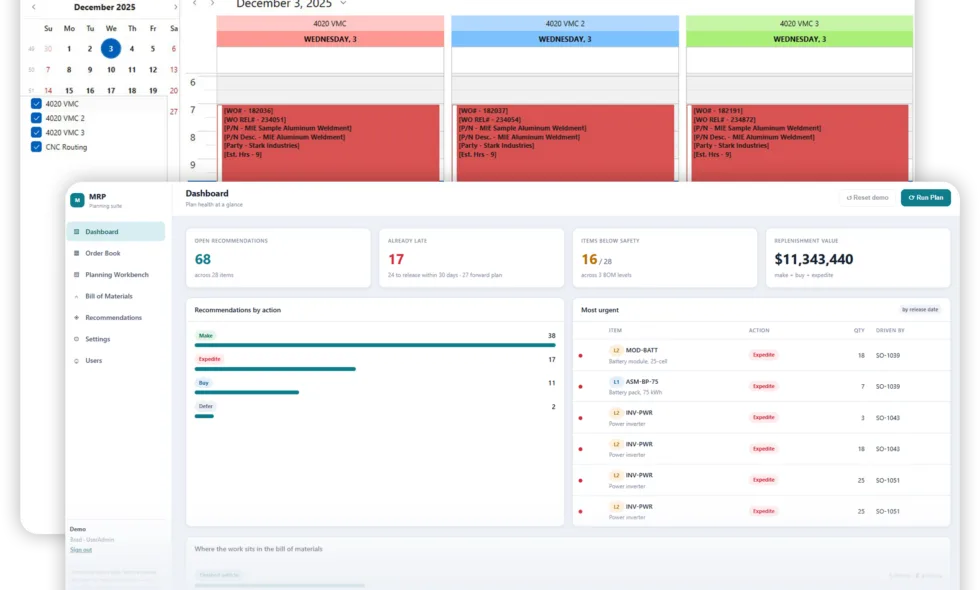
Material planning calculates what the business needs and when based on sales orders and demand frequency. Production scheduling functionality coordinates the timing and sequencing of manufacturing tasks to optimize efficiency. Advanced scheduling features often include Gantt charts, drag-and-drop interfaces, and what-if scenario modeling to help you respond quickly to changing priorities or supply chain disruptions.
Purchasing, inventory, and warehouse management
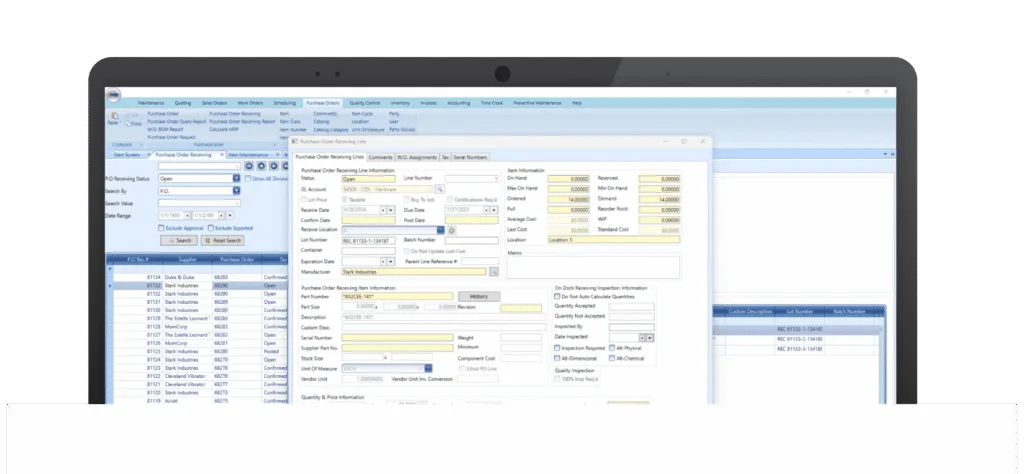
Purchasing tools automate requisitions, purchase orders, and invoice matching. Inventory and warehouse management track stock at multiple locations, automate reordering, and support cycle counting. Effective inventory modules support multiple valuation methods (FIFO, LIFO, weighted average) and provide automated reorder points based on forecasting.
Extract Production, an oil and gas services manufacturer, reduced stockouts by 22% and saved $11 million in inventory costs after adopting this type of manufacturing software.
Shop floor reporting and work-in-progress tracking
Shop floor modules connect with machines and work orders through barcodes, RFID, or IIoT sensors. They update production records automatically as items move through each stage. Dashboards track work-in-progress and show first pass yield and overall equipment effectiveness. These measures reveal bottlenecks and defects before they affect an entire production run.
Quality checks, lot tracking, and compliance records
Quality management modules ensure that your products consistently meet specified standards while supporting regulatory compliance. Lot tracking gives every batch a unique number and records supplier details, production dates, and test results. Teams can trace any item from raw material to finished good.
Product recalls in the United States reached a seven-year high in 2023, rising 11% year over year to 3,301 events across five regulated industries. Strong traceability and documented quality checks reduce a recall’s scope and help teams respond faster when issues arise.
Job costing, accounting, and business reports
Job costing separates every project into labor, materials, and overhead. It shows true profitability instead of relying on a lump-sum estimate. A financial management module connects production data directly to the general ledger, keeping the cost of goods sold accurate and giving finance a clear view of margins without entering the same numbers twice.
CRM and sales order processing
CRM integration within manufacturing ERP connects customer-facing processes with production operations. This functionality allows sales teams to access critical information like order status, inventory availability, and delivery timelines in real-time, enabling them to provide customers with accurate updates and set realistic expectations.
ERP Deployment Options: Cloud, On-Premise, and Hybrid Models
Your deployment model choice affects daily operations, costs, and long-term flexibility. Where your system lives, how you pay for it, and who manages the infrastructure shapes your manufacturing operations for years to come.
Cloud ERP for Manufacturing: Subscription and scalability
Cloud ERP for manufacturing operates on remote servers accessed through the internet, eliminating extensive on-site hardware investments. Instead of purchasing expensive hardware and licenses, you pay predictable monthly fees that include maintenance and automatic updates. In 2025, 72% of organizations chose SaaS ERP.
The financial advantages are compelling—companies migrating from on-premise to cloud ERP report savings up to 40%. Forrester Research shows that cloud ERP systems reduce total cost of ownership by 30-50% over five years compared to on-premise deployments.
Cloud ERP for manufacturing typically completes deployment within 3-6 months, while on-premise implementations often stretch beyond 12 months.
On-premise ERP: Control and customization
On-premise ERP systems run on your company’s local servers and are maintained by internal IT staff. This deployment model gives you complete control over data, infrastructure, and upgrade schedules.
For manufacturers in highly regulated industries such as aerospace, defense, and medical devices, on-premise solutions provide enhanced security and compliance advantages. The primary benefit is customizability—these systems can be extensively tailored to align with specific operational needs.
On-premise systems require substantial capital expenditure from day one. On-premise maintenance fees typically consume 15-30% of the initial software investment annually. SaaS subscriptions typically cost $40 to $600 per user each month, while on-premises custom systems can cost about $3,200 per user as a one-time perpetual license fee.
Hybrid ERP: Combining flexibility and security
Hybrid ERP deployment combines elements of both cloud and on-premise models. Certain applications or modules run in the cloud while others remain on-premise. This approach is especially valuable for complex manufacturers in highly regulated industries where certain functions require heightened security or uptime guarantees.
Comparing deployment models: Which fits your business?
Cloud-based ERP works best for manufacturers seeking rapid deployment, predictable costs, and minimal IT overhead. On-premise ERP suits manufacturers in highly regulated industries requiring maximum data control or those with specific customization needs. Hybrid ERP provides the middle ground for manufacturers with mixed requirements.
Key Benefits of Manufacturing ERP Systems
Manufacturing ERP implementation delivers measurable results that directly impact your bottom line.
Real-time visibility across operations
Manufacturing ERP software gives decision-makers accurate, up-to-the-minute visibility across the entire production process. Rather than relying on outdated reports or incomplete spreadsheets, you gain a unified view where every department feeds into a single system that updates in real time.
Reduced lead times and production delays
Advanced scheduling capabilities allow manufacturers to dynamically adjust production plans based on demand, material availability, and capacity constraints. Some companies have reported cutting late orders by approximately 30% after implementing ERP systems with live scheduling and production tracking capabilities.
Improved inventory accuracy and cost control
80% of small to medium-size businesses suffer from insufficient planning and excess inventory. ERP systems help overcome these challenges by aligning stock levels with actual demand, enabling just-in-time inventory practices that minimize storage costs and obsolescence risks.
Enhanced customer satisfaction through better order tracking
ERP systems enable real-time updating of inventory data, providing customer service teams with immediate access to accurate information. Sales teams gain valuable insights into the entire order-to-cash process, from estimates to quotations to delivery status.
Measurable ROI and business impact
A Forrester study found that a manufacturing company achieved 106% ROI over three years and reached payback in 17 months. 83% of organizations that completed a pre-implementation ROI analysis and had used their ERP for more than a year said the project delivered the expected ROI.
When Does Your Manufacturing Business Need ERP?
Recognizing when your manufacturing business needs an ERP system requires honest assessment of your current operations.
Signs of operational inefficiencies
If your staff are overwhelmed by manual processes requiring constant data re-entry, a specialist manufacturing ERP is usually overdue. Other signs include demand forecasting and production planning that regularly miss the mark, difficulty tracking production costs accurately, and staff spending hours creating reports and re-entering data.
Survey data shows 78% of UK manufacturers face significant operational inefficiencies that decrease productivity and increase costs.
Data silos and manual processes
Data silos develop when departments adopt separate software tools without connecting them to a central system. Companies lose 20-30% of their revenue annually due to inefficiencies caused by data silos.
Scaling challenges and growth bottlenecks
Companies experiencing rapid expansion often discover that their existing technology processes no longer align with new business needs. If your company struggles to manage increased complexity, faces challenges with remote operations, or lacks sufficient data analysis capabilities, your current systems have become growth limitations.
Setting goals to measure the value of a new system
Build a business case with clear goals, expected benefits, and total costs before signing with a vendor. Measurable goals work best when they focus on outcomes such as lower inventory costs, better machine uptime, and stronger production and delivery performance.
How to Choose the Best ERP for Manufacturing
Choosing the best ERP for manufacturing depends on matching options to how products are made, not just to what looks impressive on a sales sheet.
Match your shortlist to production type and business size
Classify operations as engineer-to-order, make-to-order, make-to-stock, configure-to-order, process, repetitive, or job shop. Small manufacturers usually budget $50,000 to $250,000 for total ownership costs in year one, while mid-market firms spend $250,000 to more than $1 million.
Separate must-have needs from optional features
Rank requirements as must-have, should-have, or nice-to-have. Create a weighted scorecard to compare options objectively. Request demonstrations from leading providers such as SAP, Dynamics 365, Oracle, Infor, or Epicor to evaluate user experience firsthand.
Test real workflows in vendor demos
Give vendors a scripted list of distinguishing requirements and sample data before the demo. Keep the shortlist to three or four systems. Ask vendors to show exactly how their system manages your unique workflows—whether that’s complex BOMs, lot tracking requirements, or specific compliance needs.
Check vendor experience, customer references, and support
Review case studies, check references, and visit customer sites when possible. Talk to other manufacturers who have implemented the system, asking about implementation challenges, ongoing support quality, and whether the system delivered promised benefits.
Review security, system connections, and room for growth
Confirm role-based access, SSO/MFA, and encryption. Check for open APIs and native connectors for PLM, MES, and WMS. Evaluate scalability—can the system handle increased transaction volumes, additional users, new product lines, or geographic expansion?
Agree on a rollout plan, staff training, and go-live support
A mid-size, single-site rollout usually takes 6 to 9 months after an 8 to 12-week selection process. Effective ERP implementation depends on thorough user training tailored to individual roles and departments.
Understanding Manufacturing ERP Cost and Total Ownership
Total Cost of Ownership (TCO) encompasses all direct and indirect expenses throughout the system’s lifecycle.
Licensing, implementation, and training costs
Implementation costs typically equal 1x to 3x the first-year software fee. The average per-user budget for an ERP project reaches $7,200, with mid-sized businesses spending approximately $8,542 per user over a five-year period.
Data migration alone can cost $15,000 to more than $150,000. Initial training often costs $1,000 to $2,500 per user.
Hidden costs: upgrades, support, and downtime
On-premise deployments face annual maintenance fees that typically consume 15-30% of the initial software investment. Organizations should expect to pay 18-22% of their initial license cost annually for technical support and updates. Experts recommend maintaining a contingency budget of approximately 10% beyond estimated costs.
Compare total cost with expected returns
A practical benchmark is to budget about 3% of annual revenue, or roughly $7,200 per user over five years. Companies that complete ERP implementations report average ROI near 150%, with payback periods of 12-24 months.
Steps to Successfully Implement ERP in Manufacturing
Organizations that follow structured methodologies achieve higher adoption rates and maximize return on investment.
Customization and configuration planning
Focus on built-in configuration options rather than extensive modifications that complicate future upgrades. Define the implementation scope early, including which modules will be implemented first and their integration points.
Data migration and validation
Data migration demands thorough preparation. Remove outdated records, standardize formats, and ensure proper mapping between systems. Test small batches before full migration to identify errors early.
User training and change management
Use a blended approach combining classroom instruction, online modules, and hands-on practice. Training isn’t a one-time event—people retain material better through repeated exposure. Change management strategies help overcome resistance by addressing concerns and highlighting system benefits.
System testing and phased go-live
Rigorous system testing with actual end users, not just IT teams, uncovers misconfigurations before they disrupt operations. Many manufacturers prefer phased implementation, deploying specific modules or business units sequentially instead of all-at-once approaches.
Conclusion
The choice of manufacturing ERP software depends on how well its features and deployment options fit your business’s operating model and budget. Cloud solutions provide the flexibility and speed most manufacturers need today, while on-premise systems deliver the control that highly regulated industries require. Hybrid approaches give you the best of both worlds.
Selecting the right system requires honest assessment of your specific needs rather than chasing the latest features. The best ERP for your business aligns with your workflows, integrates with your existing tools, and grows alongside your operations.
Without doubt, the research stage matters most. A scorecard and real-workflow testing, backed by vendor reference checks, can prevent costly mistakes. Implementation is a long-term investment, so clear ROI goals before launch and ongoing tracking afterward will help ensure the system earns its keep over the years ahead.
Frequently Asked Questions
ERP connects production, inventory, purchasing, sales, and finance in one system. It helps teams plan materials, track costs, manage quality, and reduce manual data entry. Manufacturing ERP software gives decision-makers accurate, up-to-the-minute visibility across the entire production process, enabling faster decision-making and better coordination across departments.
The best ERP for manufacturing depends on your specific production type, business size, and operational requirements. Match your shortlist to your production type—whether engineer-to-order, make-to-order, make-to-stock, configure-to-order, process, repetitive, or job shop. Leading providers include SAP, Microsoft Dynamics 365, Oracle, Infor, and Epicor, but the right choice aligns with your workflows and grows alongside your operations.
Choose a system that fits your production type, business size, and essential workflows. Start by documenting your existing manufacturing environment, including current product lines, BOM complexity, and demand patterns. Rank requirements as must-have, should-have, or nice-to-have, then create a weighted scorecard to compare options objectively. Give vendors a scripted list of requirements and sample data before demos, keeping your shortlist to three or four systems.
ERP systems for manufacturing are comprehensive software solutions that integrate core business processes into a single, unified platform. They serve as a centralized hub for managing everything from supply chain and inventory to production scheduling and customer orders. Manufacturing ERP systems address industry-specific challenges like production planning, inventory management, quality control, and order tracking with specialized modules.
The main options are cloud-based, on-premises, and hybrid. Cloud ERP is hosted by the vendor with predictable subscription costs and faster deployment (typically 3-6 months). On-premise ERP runs on your own infrastructure with complete control over data and customization. Hybrid ERP combines elements of both models, allowing certain applications to run in the cloud while others remain on-premise.
The average per-user budget for an ERP project reaches $7,200 over five years, with mid-sized businesses spending approximately $8,542 per user. Implementation costs typically equal 1x to 3x the first-year software fee. SaaS subscriptions typically cost $40 to $600 per user monthly, while on-premises systems can cost about $3,200 per user as a one-time license fee. A practical benchmark is to budget about 3% of annual revenue.
MRP (Material Requirements Planning) focuses on determining materials needed, required timing, and quantities to meet production schedules. ERP for manufacturing incorporates MRP into a broader structure that also handles purchasing, accounting, quality tracking, and reporting. An ERP can include MRP functionality, but an MRP system doesn’t include the broader business management capabilities of ERP.
A mid-size, single-site rollout usually takes 6 to 9 months after an 8 to 12-week selection process. Cloud ERP typically completes deployment within 3-6 months, while on-premise implementations often stretch beyond 12 months. Phased implementations, deploying specific modules or business units sequentially, may take longer but reduce risk.