Key Takeaways
Choose scheduling software that reflects real fabrication constraints, improves delivery reliability, and helps planners respond quickly to daily disruptions.
- Test vendors with real jobs, shared bottlenecks, rush orders, material delays, and outside processing, not polished demo data, to verify schedules are truly achievable.
- Prioritize finite-capacity scheduling for machines, materials, tooling, and certified labor; it prevents hidden overloads and produces reliable delivery commitments.
- Reduce changeovers by sequencing jobs by material, gage, tooling, or finish color, an approach that can recover 10–20% of productive capacity.
- Choose APS when high-mix work, frequent disruptions, spreadsheet scheduling, or sub-90% on-time delivery expose the limits of ERP’s infinite-capacity planning.
- Require dynamic rescheduling, what-if analysis, multi-resource visibility, bidirectional ERP/MES integration, and shop-floor data capture before selecting a solution.
Comparing production scheduling software for a metal fabrication shop starts with understanding what your shop actually looks like on a given Tuesday. A typical fabrication shop runs 200 to 500 active jobs at once, spanning hundreds of unique part numbers. Each job can follow a different path through the shop. That means you can’t judge a scheduling tool by how it handles one tidy, repeatable product line. You need to see how it handles chaos.
A single fabricated part might move through five to ten operations: cutting, deburring, bending, welding, grinding, machining, surface treatment, and inspection. Every one of those steps competes for shared equipment, and the sequence can’t be reordered. Welding has to happen before painting, not after. The real question when evaluating manufacturing production scheduling software is whether it can juggle all of these unique routings simultaneously without creating conflicts on the shop floor.
Welding deserves particular attention. It’s the primary capacity constraint in most fabrication shops, with operations that vary enormously in duration, from a 15-minute tack weld to a 40-hour structural assembly. On top of that, many shops find that skilled labor, not machinery, is the tighter bottleneck. Software that schedules against welder certifications and availability, rather than assuming any operator can run any job, is what you actually need.
Setup time is another factor worth examining closely. Press brakes need tooling changes, welding stations need fixture swaps, and finishing lines need color changes between jobs. Software that groups similar jobs by material, thickness, tooling, or finish color can recover 10 to 20 percent of productive capacity without buying a single new machine. That’s a meaningful number. Ask each vendor to demonstrate this specifically rather than take it on faith.
Material availability matters just as much as machine capacity. Good production planning software should confirm that steel or bar stock is on hand before a job enters the executable schedule, preventing fabrication from starting on something that will stall mid-stream. It’s also worth checking how the system handles ripple effects. Spreadsheets simply can’t calculate the downstream impact of a single schedule change across 300-plus machines and dependent operations. That’s exactly the kind of math APS tools are built to handle.
Beyond these fabrication-specific considerations, several broader factors shape which production scheduling software fits your shop:
- Budget and total cost of ownership: setup costs, subscription fees, and hidden customization or integration expenses
- Complexity and ease of use: the learning curve and training support available
- Integration capabilities: compatibility with existing ERP, accounting, and nesting systems
- Scalability: whether the system grows with added jobs, users, or production sites
- Deployment: cloud versus on-premise, and realistic setup timelines
The most reliable way to compare options is straightforward: shortlist two or three candidates, then hand each vendor the same real job, drawing, and routing. Load competing jobs onto a shared constrained machine, add a rush order, a material delay, and an outside finishing step, then watch whether the promised date reflects actual machine, labor, and material constraints, not just a drag-and-drop board.
ERP Scheduling vs. Standalone Scheduling vs. Advanced Planning and Scheduling (APS)
So your shop needs better scheduling. The next question is where that function should actually live: inside the ERP you already run, in a standalone scheduling add-on, or in a dedicated Advanced Planning and Scheduling (APS) system. Each option answers a different question, and picking the wrong one is an expensive mistake.
ERP scheduling starts from MRP logic. It explodes the master schedule through the bill of materials, nets out inventory, and generates purchase and work orders with due dates, all while assuming every work center has infinite capacity. It plans at the order level in daily or weekly buckets. That means it can tell you that an order needs to finish by a given week, but not which of the dozen jobs competing for one press brake runs first. The numbers tell the story: across decades of implementations, 60 to 80 percent of manufacturers end up abandoning their ERP scheduler for daily production planning and reverting to spreadsheets or whiteboards instead. When the floor changes, ERP typically has to rerun its full scheduling batch, a process that can take 30 minutes to two hours. During that time, the shop floor has no updated plan to follow.
Standalone scheduling software takes a narrower approach. Built solely for sequencing, resource allocation, and capacity planning, it’s the right fit for shops that want to keep their ERP as the system of record for orders and inventory while adding a dedicated engine for the floor. Some vendors sell this as a one-time licensed module that layers finite capacity scheduling onto whatever ERP a shop already runs, rather than charging ongoing per-user fees.
APS goes further still. It uses advanced algorithms to balance demand against capacity and generate achievable schedules, which translates into shorter lead times and faster responses when a rush order lands. APS covers two distinct planning layers: strategic production planning spanning months to years, and detailed production scheduling covering days to a few weeks. One system, two planning horizons.
Manufacturers running APS consistently report:
- Increased resource allocation and tool utilization
- Earlier bottleneck detection
- Faster rescheduling when production changes
- Lower work-in-process (WIP)
- Reduced raw material inventory
A useful way to frame all three options is by decision horizon. Each system owns a different layer of planning. Long-range S&OP runs 6 to 18 months out. Master planning and MRP cover weeks to months. Detailed APS scheduling works in days to four weeks. Shop-floor dispatch operates shift to shift.
| System | Capacity Model | Typical Horizon |
|---|---|---|
| ERP scheduling | Infinite capacity, bucketed | Weeks to months |
| Standalone scheduling | Finite capacity add-on | Days to weeks |
| APS | Finite capacity, constraint-optimized | Days to months |
Shops running under 200 active orders with stable setups often get by with ERP plus a solid execution layer. Shops juggling hundreds of concurrent high-mix jobs are where dedicated APS pays for itself. If you’re already invested in a specific ERP, it’s worth checking embedded APS modules such as SAP PP-DS, Microsoft Dynamics 365 SCM, Infor SyteLine APS, or IFS APS before committing to a separate system.
Seven Features to Compare Before Choosing Scheduling Software
Not every scheduling tool that looks impressive in a sales demo will hold up on a real shop floor. Before shortlisting vendors, here are the seven features worth evaluating side by side. These are the ones that separate a system built for fabrication from one built for a slideshow.
Finite capacity modeling. The software needs to schedule against real machine, labor, tooling, and material limits rather than assuming every work center has unlimited availability. When capacity runs short, a finite-capacity schedule should push the date out rather than silently overload a bottleneck. Detailed scheduling solutions manage activity windows ranging from seconds to weeks out, which is a fundamentally different level of granularity than the weekly buckets most ERP systems produce.
Dynamic rescheduling. A broken press brake or an absent welder shouldn’t require a manual rebuild of the entire plan. The system should calculate the downstream impact in minutes and surface reassignment options automatically rather than hand that math back to the planner.
Sequence-dependent setup logic. Grouping jobs by material, gage, tooling, or finish color reduces changeovers on bottleneck resources like press brakes and paint lines. This matters far more on a fabrication floor than on a single-product assembly line, where setups are predictable and infrequent.
What-if scenario testing. Before committing any change to the live schedule, planners should be able to simulate a rush order, an added shift, or a machine outage, then compare the effect on due dates, bottlenecks, and resource loading side by side. No surprises after the fact.
Visual, multi-resource scheduling views. A Gantt chart that shows only one job at a time isn’t enough. Look for workload and capacity overlays across rolling windows, including views spanning 4, 8, and 12 weeks that flag overloads before they hit delivery dates and allow filtering to filter by work center, job status, or due date at a glance.
ERP/MES integration with bidirectional sync. Prebuilt connectors to platforms like SAP, Oracle, Epicor, or Microsoft Dynamics matter, and so does an open API for the tools that don’t have one. Floor progress should flow back into the ERP automatically, with no duplicate data entry between systems.
Shop floor data capture tied to performance KPIs. Operators need a simple way to log progress, report breakdowns, and record non-conformances from a terminal or tablet, ideally with an offline mode that auto-syncs when connectivity returns. That data should roll up into dashboards covering on-time delivery, schedule adherence, lead time, capacity utilization, throughput, and changeover performance.
A vendor that can’t demonstrate all seven of these against a real work order is worth questioning. The floor doesn’t run on demo data.
Production Scheduling Software Options for Metal Fabricators
Shop size, product mix, and how much customization your team can realistically manage in-house. These three factors narrow the field faster than any feature checklist. Here’s a look at the main options on the market and what each one actually does.
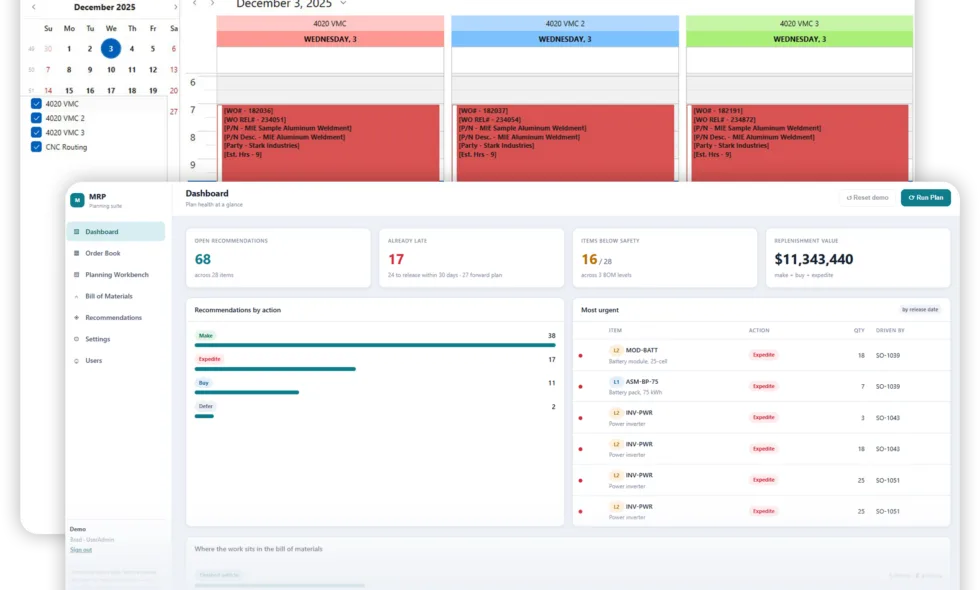
MIE Trak Pro combines production scheduling with quoting, work orders, inventory, purchasing, and shop-floor execution in an ERP system built for job shops and metal fabricators. Unlike systems limited to a single scheduling approach, MIE Trak Pro supports four methods: backward infinite, forward finite, whiteboard, and cell scheduling. Planners can use drag-and-drop controls to adjust priorities, view capacity through Gantt charts and load reports, and schedule jobs based on machine availability. Additional capabilities include splitting work orders across stations, nesting multiple jobs to improve machine utilization, and displaying real-time schedules through MIE Kiosk. This makes it an option for fabricators looking to manage scheduling and daily production within one connected ERP system.
DELMIAWorks (formerly IQMS) builds its manufacturing scheduling around real-time data pulled from across the supply chain and ERP. The visual scheduling module gives planners a color-coded view of the entire schedule, and the drag-and-drop interface lets them resequence jobs without rebuilding the plan from scratch. Capable-to-Promise and Available-to-Promise logic, Master Production Schedule generation, and MRP are all bundled in, so promise dates reflect actual plant throughput rather than guesswork.
Trimble FabShop takes a narrower approach, focused specifically on HVAC fabrication. Auto shape nesting cuts material waste, custom part libraries reduce data entry, and mobile tracking keeps shop floor status synced with job site data.
JobBOSS2 combines E2 and JobBOSS expertise into a cloud-based platform. The focus is straightforward: give planners complete visibility into where any order sits in its process, with on-time delivery as the primary measure of success.
MRPeasy brings dynamic Gantt charts with drag-and-drop scheduling, Master Production Schedule functionality, and multi-layered Bill of Materials management to both make-to-stock and make-to-order fabricators. Aston Precision in Melbourne, MPW Precision in the UK, and A Wrate Engineering in London all run it as a full manufacturing ERP.
For smaller steel fabrication shops with 15 to 150 people, EZIIL offers flat pricing by team size rather than per seat, starting around €120/USD 140 a month. The results from early adopters are worth noting: UPFab, a 35-person Michigan shop, gained three months of forward capacity visibility and raised early quotes by 15 percent after switching to it. FLI Structures eliminated its weekend and night rescue shifts and now runs 100 concurrent jobs through the system.
For harder constraint problems, PlanetTogether APS treats high-mix, low-volume routings, sequence-dependent setups, and certified-welder availability as actual scheduling constraints rather than afterthoughts. EDGEBIC (RMDB 2.0) sells as a one-time license: USD 25,000 for APS or USD 35,000 with MRP included, with implementation measured in days rather than months. One metal fabrication repair shop took its on-time shipping rate from 30 to 90 percent inside a five-day rollout.
At the enterprise tier, Siemens Opcenter APS (USD 75,000–500,000) and Asprova (USD 30,000–150,000) serve larger, higher-volume operations where the scale of complexity justifies the investment.
Which Scheduling Approach Fits Your Shop?
The right scheduling approach has less to do with how many people work your floor and more to do with how much variation hits it each day. That’s the question worth answering first.
When production is stable, capacity is rarely tight, and planners don’t need to run what-if scenarios every morning, ERP scheduling alone can keep delivery dates honest. Make-to-stock environments often fall into this category. High volume, low product mix, and repetitive runs make capacity predictable enough that MRP paired with rough-cut capacity planning covers the gap without detailed finite scheduling logic.
Make-to-order work is a different story. Every order brings a different configuration, demand shifts constantly, and delivery promises need to reflect what the floor can genuinely do the moment a quote goes out. That’s where finite scheduling becomes necessary for reliable commit dates. Assemble-to-order sits somewhere in between, though finite scheduling still matters at final assembly because that’s where customer-specific builds collide with real constraints. Engineer-to-order is the hardest case of all: unique projects, long lead times, and multi-level routings that stretch across extended horizons mean the gap between infinite and finite planning is felt most acutely.
Regardless of production strategy, a few concrete signals point toward APS:
- Planners are still building schedules in spreadsheets
- The shop floor routinely ignores ERP dates
- On-time delivery sits below 90 percent
- Rescheduling after a disruption eats more than 30 minutes
- Setup times vary significantly depending on job sequence
Shops running fewer than five machines on simple, repetitive work with standard routings and plenty of spare capacity rarely need that extra layer. But shops running 10 or more machines across variable, high-mix production, such as job shops, contract manufacturers, and custom builders turning out hundreds of unique part numbers a quarter, are exactly where APS pays for itself most. Finite capacity scheduling isn’t just compatible with high-mix, low-volume work; it’s arguably more critical there than in steady mass production, since order collisions and changeover conflicts happen constantly.
Questions to Ask During a Scheduling Software Demo
Walking into a demo with a fixed list of questions keeps the vendor from steering the conversation toward their flashiest features instead of my actual problems. Start by handing the vendor more demand than the shop has capacity for and watching whether the production scheduling software overloads a work center silently or flags the conflict. Reorder two jobs and check whether total capacity shifts, since that reveals whether changeovers are sequence-dependent or just an average guess. Ask what happens when a machine goes down mid-shift and how long before the schedule reflects it, then mark a component short and confirm the dependent job moves or flags on its own.
Push further on ownership. Who builds the constraint model, does the vendor walk my floor or just ship a login, and does the ERP stay the system of record once data syncs both ways? Insist on running the demo with my own production data rather than sanitized samples, since that’s the single most revealing test of real-world performance.
Before signing anything, I’d also confirm:
- Top 3 to 5 must-have features versus nice-to-haves
- Case studies from similar shops
- Whether the audit trail logs who changed what, when, and why
Frequently Asked Questions
The best choice depends on job complexity, capacity limits, and existing systems. MRPeasy and JobBOSS2 are options to compare for manufacturing planning, while PlanetTogether APS supports complex routings, setup sequences, and certified-welder availability.
Not always. Shops with simple, repetitive work and spare capacity may manage with ERP scheduling. High-mix shops with frequent changes may need finite-capacity scheduling, even with a small team.
Consider upgrading when spreadsheets cannot track competing jobs, material shortages, or the effects of schedule changes. Frequent delivery delays and lengthy manual rescheduling are also signs that dedicated software may help.
Yes. Manufacturing ERP systems combine inventory and planning functions, while standalone schedulers can connect to an existing ERP. Look for two-way data updates and material checks that prevent jobs from starting before supplies are available.
Compare ease of use, training support, integration costs, and room for growth. Ask vendors to demonstrate your actual jobs, including a rush order, machine breakdown, and material delay, rather than relying on sample schedules.